

VS Code — Visual Guide
ADR Guard for VS Code is a workspace-hosted interface over the .NET CLI. The extension provides navigation, forms, settings, and Problems diagnostics; the CLI remains authoritative for parsing, generation, editing, validation, policy, and exit codes.
For the unreleased 1.1.0 candidate, the VS Code VSIX Package GitHub Actions workflow builds and validates a versioned .vsix downloadable from the successful run’s Artifacts section for 21 days (subject to repository retention limits). This is an artifact-only installation option; the workflow does not publish to the Marketplace. See the candidate release notes for the download and manual installation procedure.
For command tables, settings keys, trust boundaries, and troubleshooting, use the VS Code extension reference. This guide focuses on the interface and common workflows.
Before you start
Section titled “Before you start”You need VS Code 1.101 or later, a trusted local file: workspace, and a compatible adr-guard executable in the workspace extension host. In WSL, Remote-SSH, or a Dev Container, install the CLI in that remote environment. The extension does not download or bundle it.
Open the interface from one of these entry points:
- select the ADR Guard icon in the Activity Bar;
- run ADR Guard: Open ADR Guard from the Command Palette;
- use the list action in the ADR Explorer title;
- run ADR Guard: Create ADR with Form to go directly to creation.
The extension reuses one panel instead of creating a new tab for each action.
ADR Explorer
Section titled “ADR Explorer”The Architecture Decision Records view lists Markdown ADRs from the configured directory. It shows bounded navigation metadata such as identifier, title, status, and recognized relationships. This metadata is not a validation result: the CLI remains responsible for determining whether a document follows the selected contract.
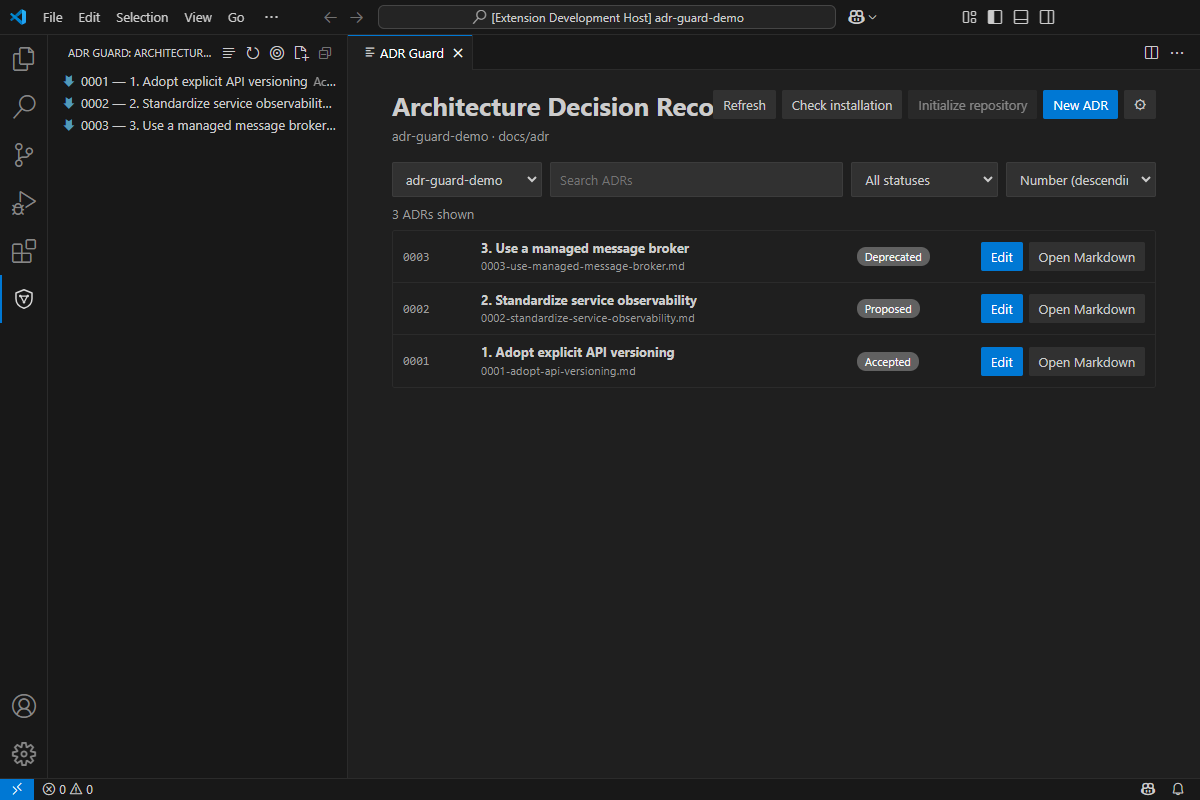
Use the title actions to refresh the tree, reveal the active ADR, create an ADR, or open the visual list. Selecting an ADR opens its Markdown file. Relationship targets are opened only after workspace, path, file type, and symlink-boundary checks.
Visual list
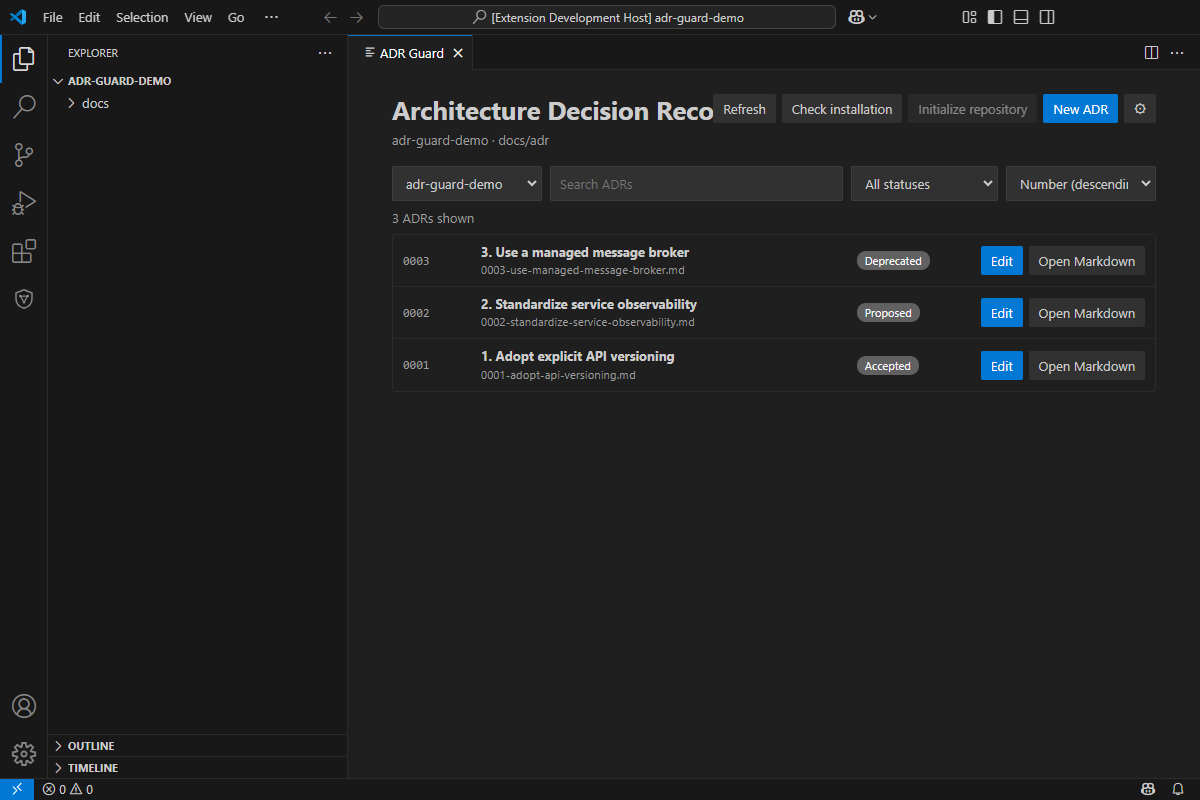
Section titled “Visual list”The home screen shows the selected workspace and ADR directory, followed by available identifier, title, path, status, and date metadata. Refresh reloads the catalog; Check installation explicitly runs the CLI version check; Initialize repository is enabled only when initialization is applicable; New ADR opens the form; and the gear opens settings.
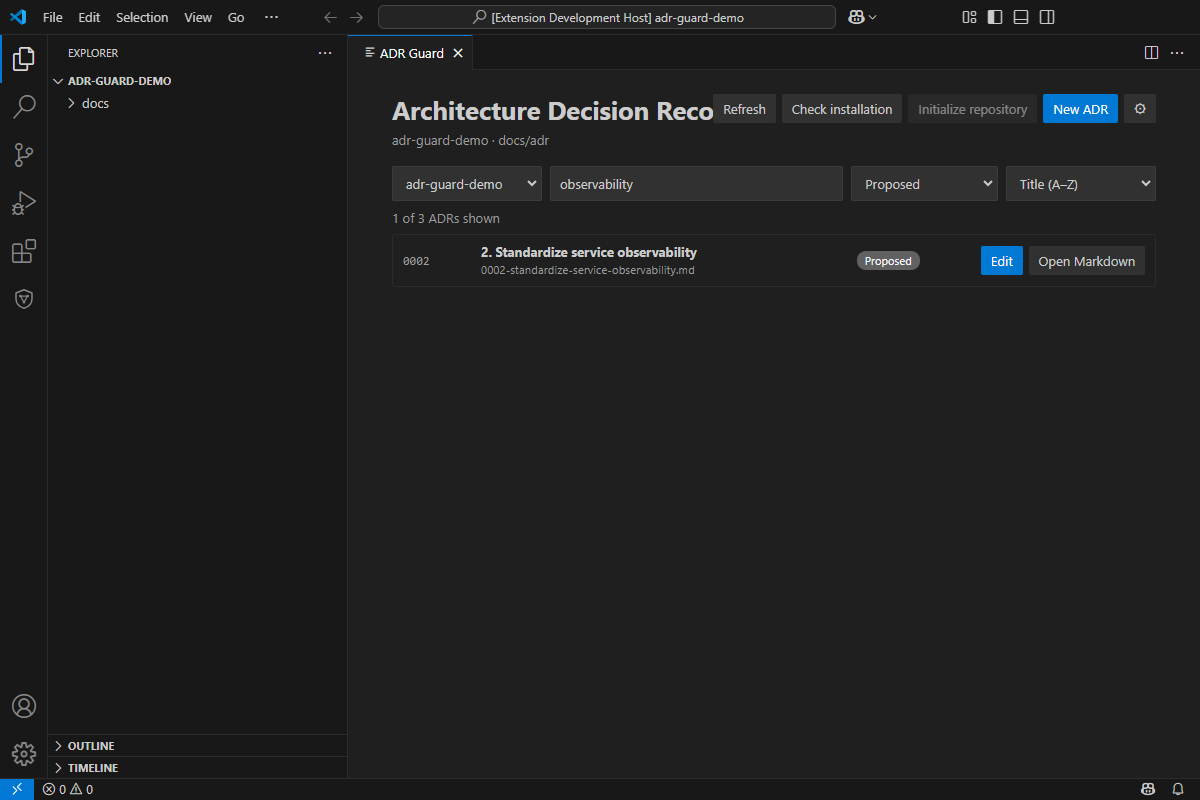
Search matches title, identifier, and relative path without case sensitivity. The status filter is built from the statuses found in the catalog. Sorting supports number in either direction, title A–Z, and newest date. These controls update read-only catalog state and do not run full validation.
Each result provides Edit and Open Markdown. Missing or incomplete display metadata stays visible as unknown rather than being inferred. File watchers refresh the list and Explorer together, while generation-safe requests prevent an older multi-root response from replacing the current folder.
Create an ADR
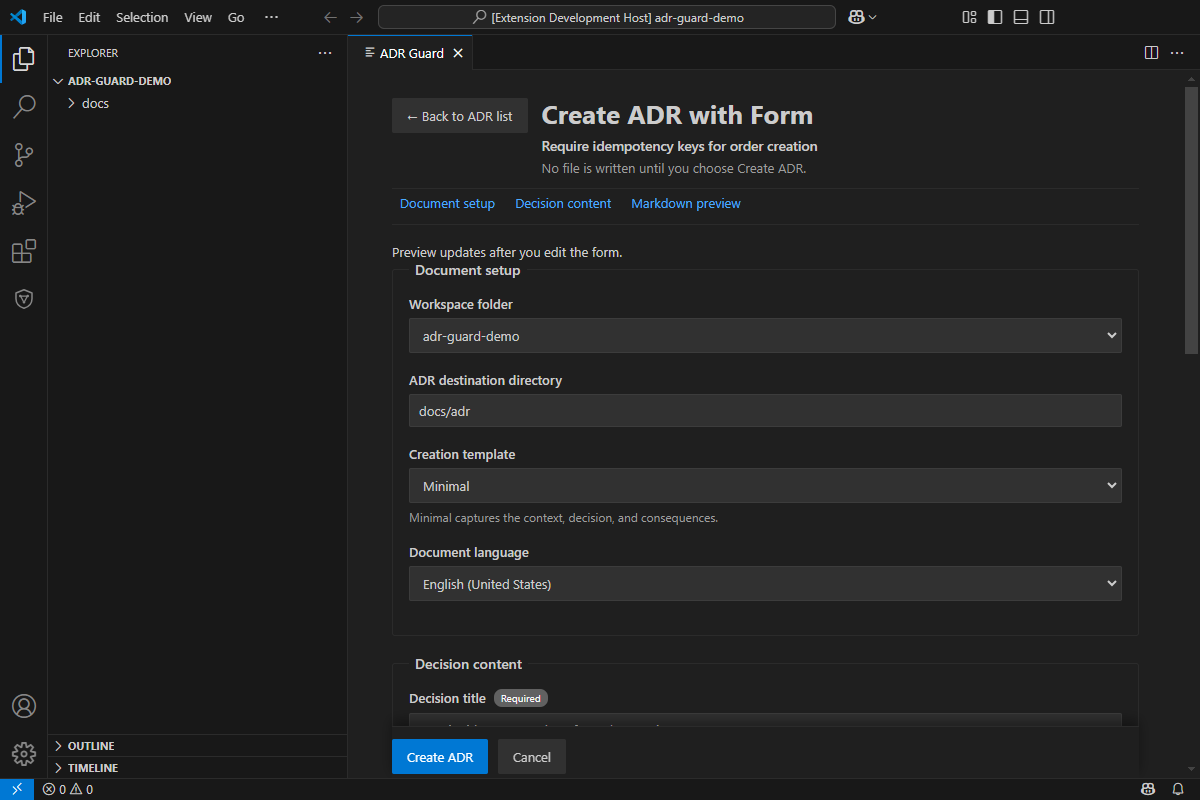
Section titled “Create an ADR”The visual form separates interface language from document language and initializes its destination and template from the selected workspace folder. No file is written while describing a template or rendering a preview. Creation occurs only after Create ADR is submitted successfully.
Minimal template
Section titled “Minimal template”Minimal requires a title plus Context, Decision, and Consequences. It is appropriate when those three sections capture the decision without additional structured prompts.
Extended template
Section titled “Extended template”Extended keeps the required Minimal fields and adds optional Decision Drivers, Options Considered, Rationale, Positive Consequences, Negative Consequences, Risks, and References. Empty optional sections are omitted from the generated document.
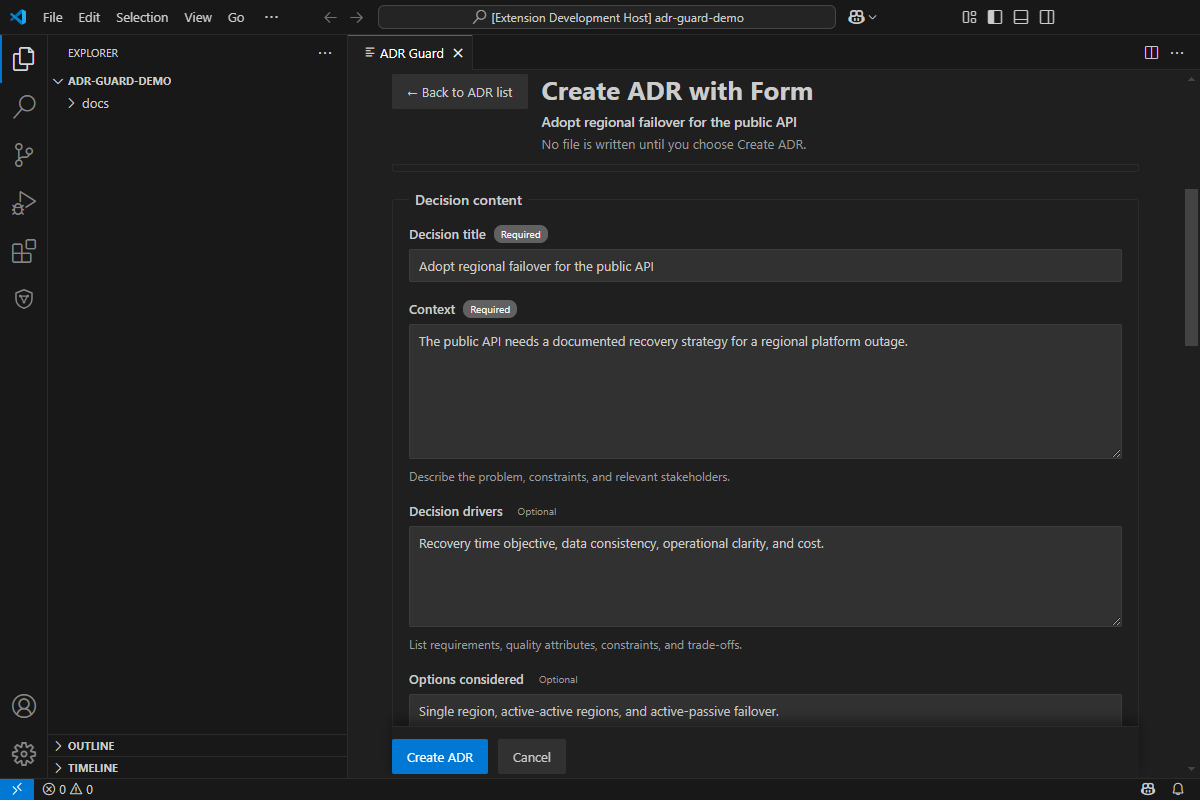
The canonical or madr-4 setting controls validation and Explorer metadata; it is not a creation-template selector. Custom configured templates cannot be mapped safely to visual fields, so the form offers Use traditional creation and preserves the CLI-configured template.
Markdown preview and navigation
Section titled “Markdown preview and navigation”The preview uses the same CLI renderer as creation. It does not reserve a number, update the index, or write a file.
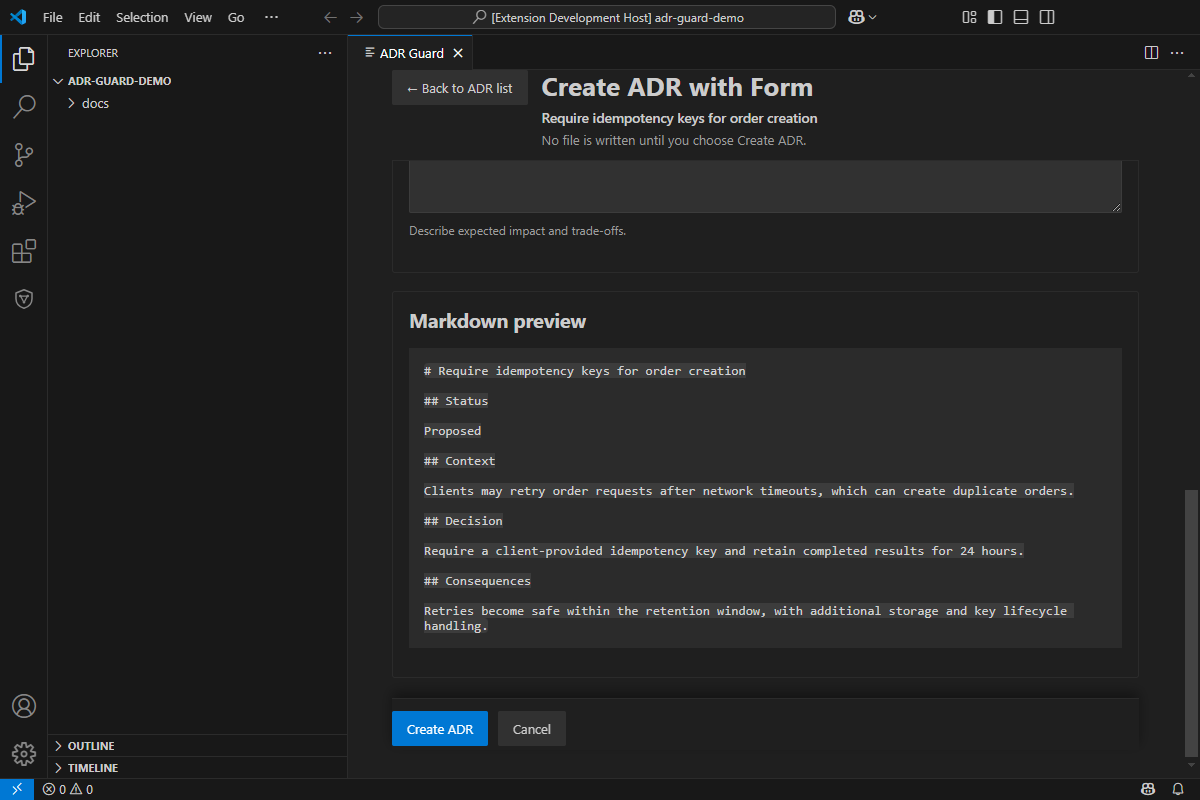
Back to ADR list and Cancel do not save. If the controlled navigation leaves changed data, the form asks before discarding it. Closing the Webview tab itself is a VS Code limitation: the extension cannot guarantee a cancellable unsaved-change prompt for that close action.
Edit an existing ADR
Section titled “Edit an existing ADR”Choose Edit on a list item to load a supported canonical or MADR 4.0 document through the CLI 1.7.0 schema 1.0 edit contract. The form exposes the supported title, status, metadata, and level-two sections while keeping the existing path and identifier fixed.
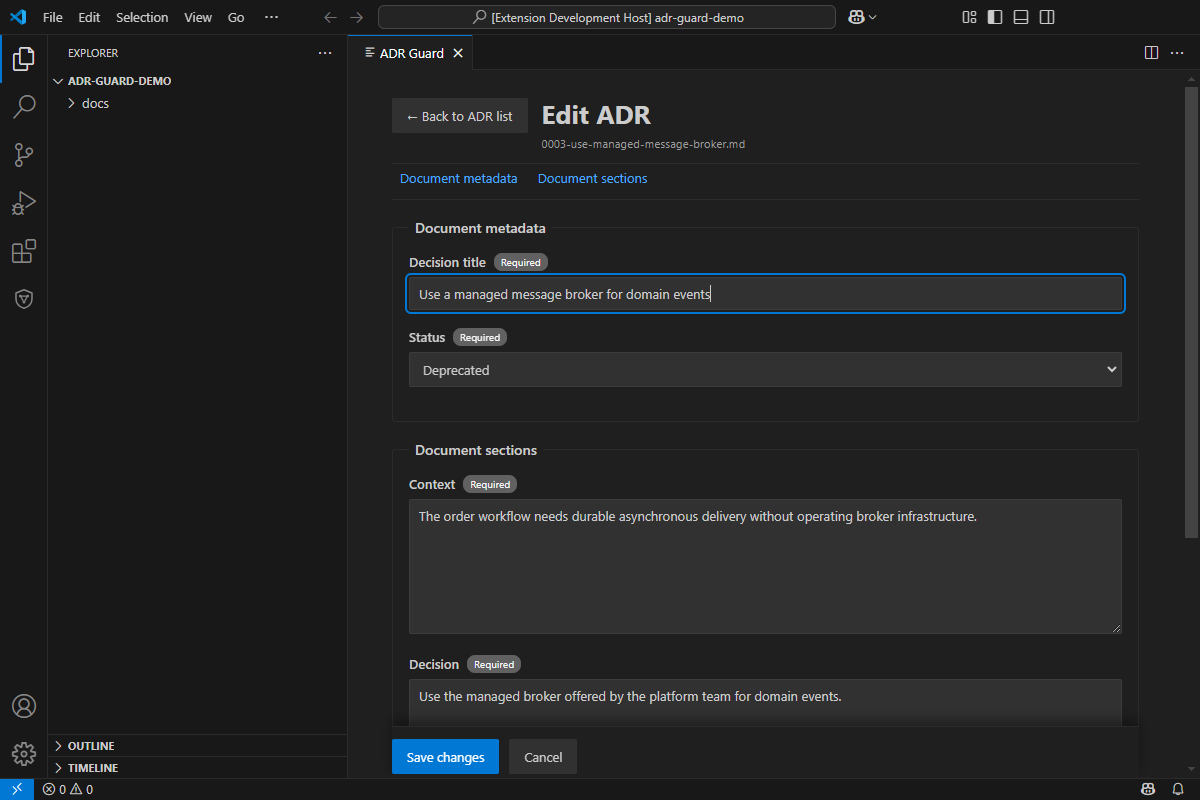
On save, the CLI performs format-aware validation and updates only supported values. Untouched metadata, sections, and spacing are preserved. A fingerprint check rejects the save if the file changed after it was loaded; reload the current document before retrying. Back and Cancel return without saving and request confirmation when the form is dirty.
Settings
Section titled “Settings”The settings gear opens preferences inside the same panel. Interface language affects ADR Guard Webview text; native VS Code commands keep the editor language. Default language for new documents and Default creation template are independent workspace-folder settings.
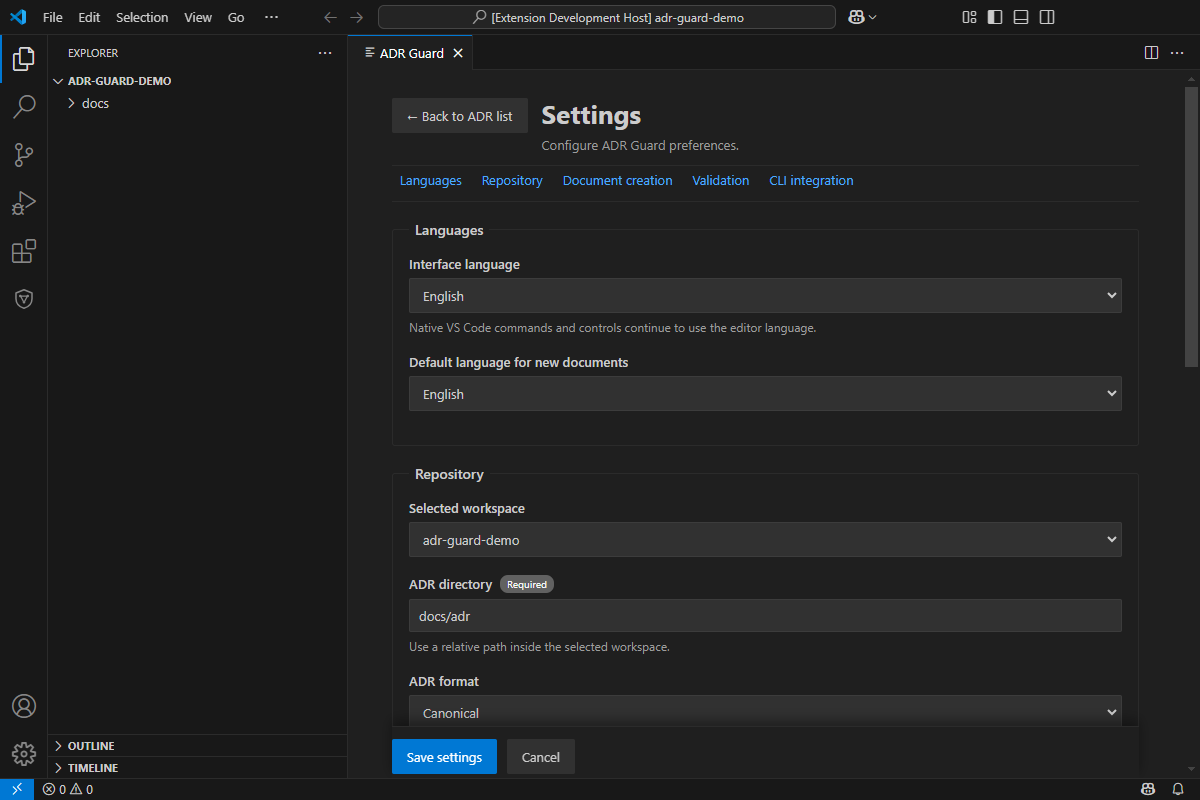
The repository section configures the workspace-relative ADR directory and the validation format. Saving settings updates VS Code configuration only: it does not create, move, delete, validate, or index ADRs. Multi-root folders may have different resource-scoped values.
Validation settings
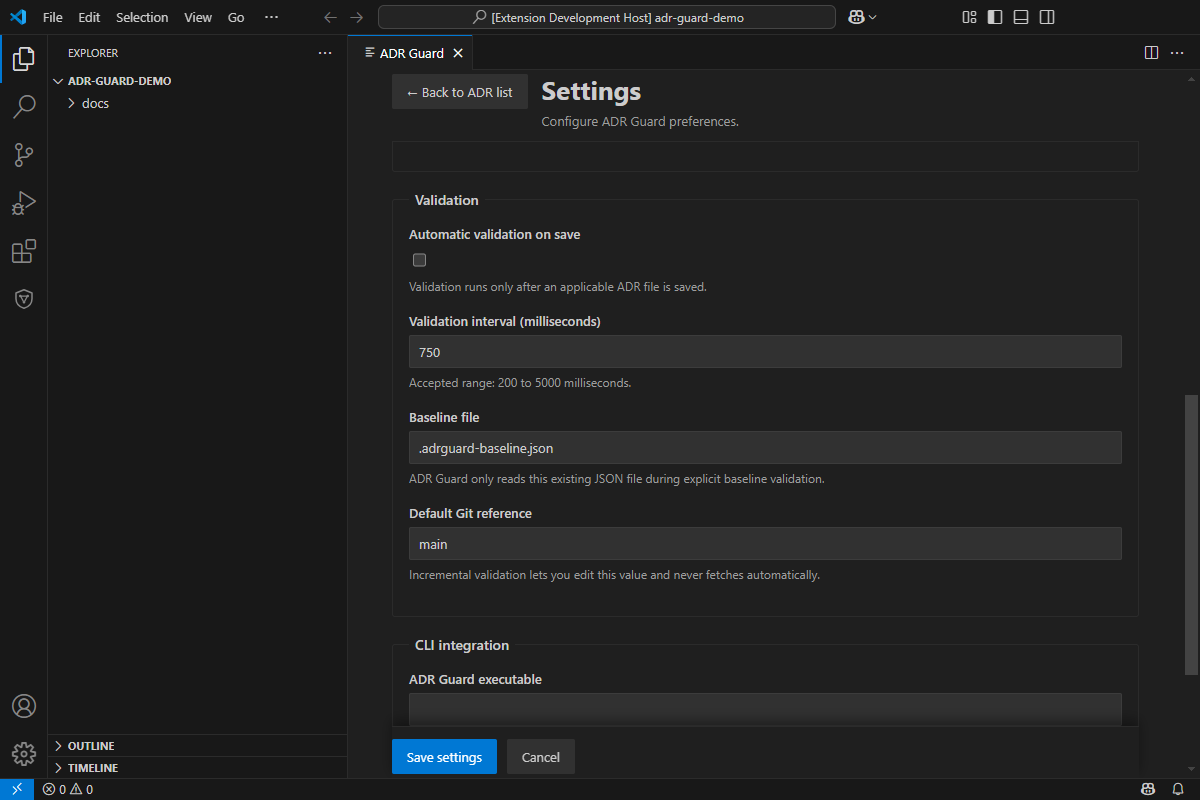
Section titled “Validation settings”Automatic validation on save is opt-in. When enabled, applicable Markdown saves are debounced using the configured 200–5000 ms interval. The baseline must identify an existing workspace-relative JSON file and is read only during the explicit baseline command. The Git reference is a local default for changed-file validation; the extension never fetches automatically.
CLI integration
Section titled “CLI integration”Leave the executable empty to use secure discovery on the extension host PATH, or set a trusted absolute machine-scoped path. Check installation is explicit and uses the last saved CLI settings. Advanced controls bound invocation time and captured stdout/stderr size.
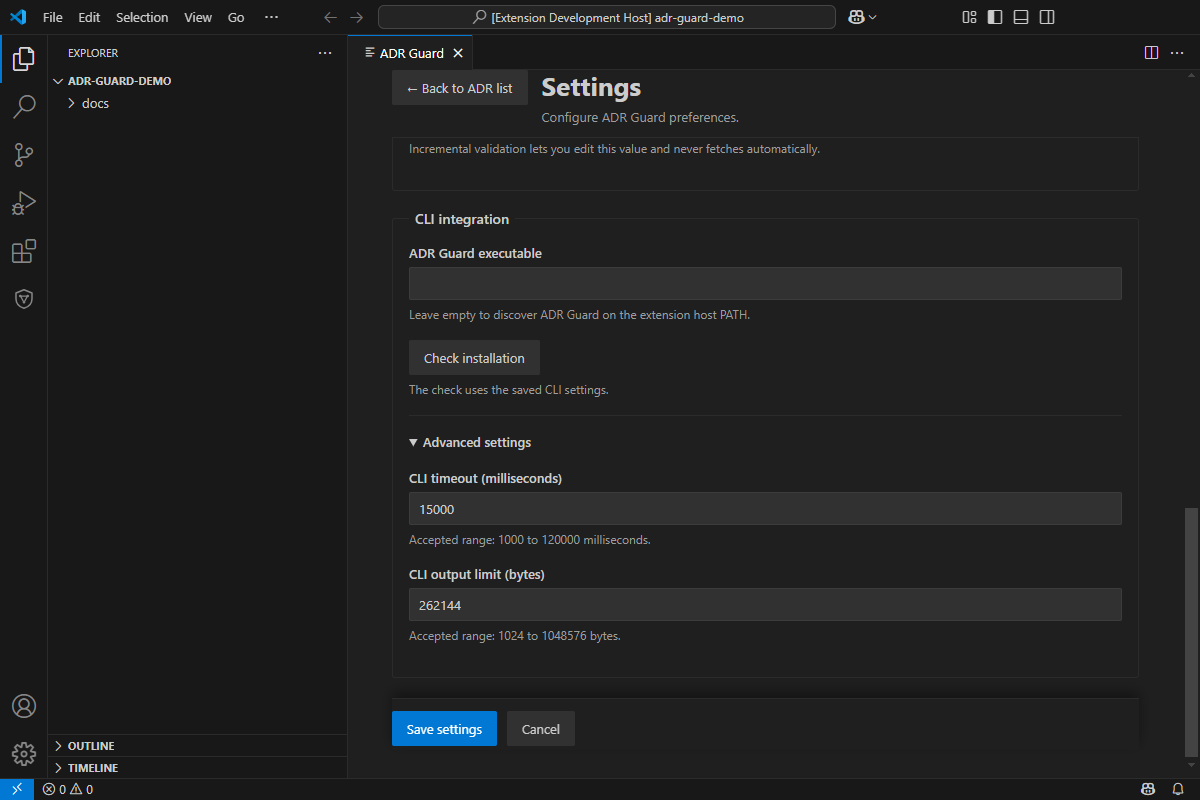
Settings are written at their documented user, machine, or workspace-folder scopes. If a grouped write fails, the extension attempts to roll back earlier writes and keeps the draft available instead of reporting partial success.
1.1.0 release-candidate analysis and integrations
Section titled “1.1.0 release-candidate analysis and integrations”The 1.1.0 release-candidate panel adds Architecture Impact, Architectural Fitness, Diagnostic Baselines, ADR Catalog, AI-Assisted ADR Draft, and AI-Assisted Technical Review cards. Opening a card does not execute it. Results appear only after explicit execution and remain scoped to the selected workspace. Impact and drift preserve evidence and uncertainty; unknown is not shown as success. Baseline replacement, catalog generation, and draft creation require explicit confirmation. AI forms disclose provider, model, and selected context before transmission.
The same settings screen adds Architecture Analysis, AI Providers, and MCP Integration sections. MCP is disabled by default and its check reports configuration availability, not a live connection. See the extension reference and MCP guide for exact behavior and release status.
Validate and inspect Problems
Section titled “Validate and inspect Problems”Use ADR Guard: Validate ADRs for full validation, Validate Changed ADRs for an explicit local base reference, or Validate ADRs with Baseline to classify findings against an existing baseline. When save validation is enabled, saving an applicable ADR schedules the same bounded diagnostic flow.
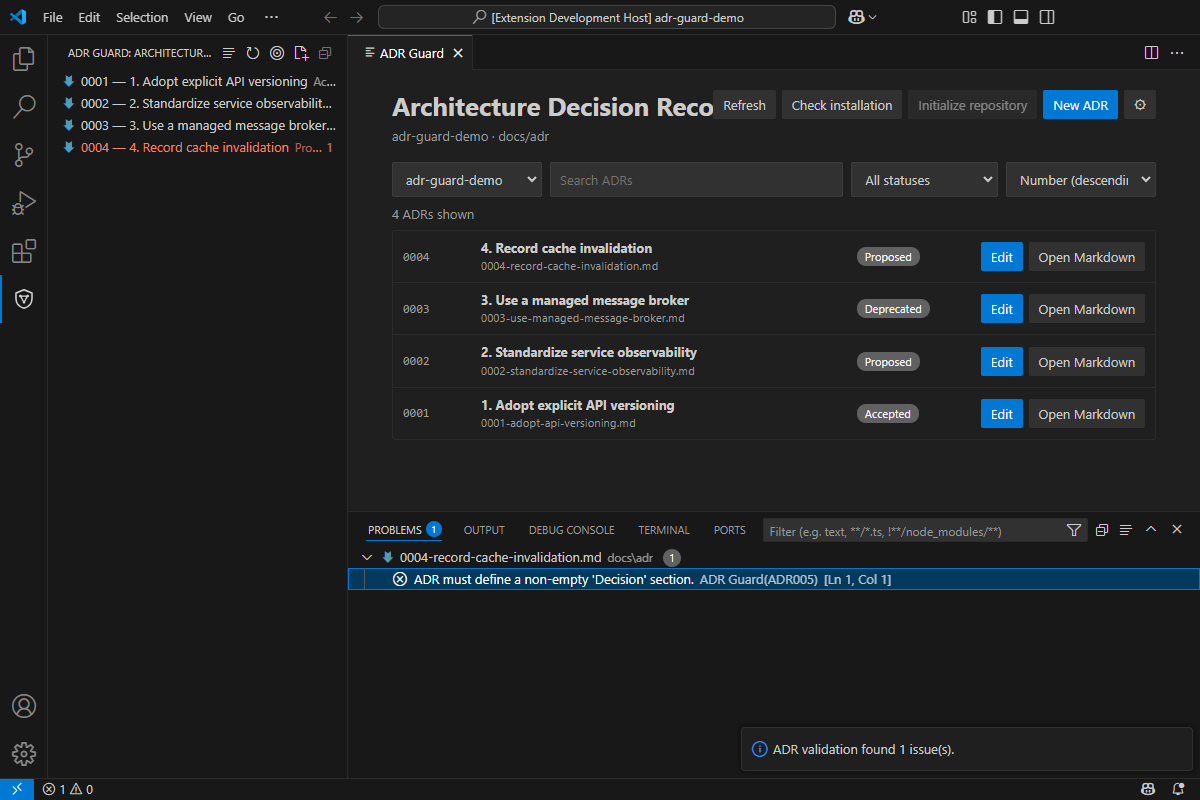
Schema 1.0 reports can include optional one-based line and column locations when the CLI has reliable parser evidence. Problems entries navigate directly to those locations; diagnostics without that evidence retain the file-level fallback at line 1, column 1. Malformed output, incompatible schemas, unsafe paths, contradictory exit codes, and CLI exits 2–4 are operational failures rather than clean validation.
Validation checks deterministic document rules. It does not approve the architectural choice, turn an ADR status into governance approval, or replace human review.
Capture provenance
Section titled “Capture provenance”All images on this page document the extension 1.0.0 interface in a real Extension Development Host with a fictitious isolated workspace, the dark VS Code theme, and a compatible CLI 1.7.0 build. No AI-generated images or reconstructed mockups are used. The optional npm run capture:vscode script in website/ rebuilds the extension and CLI, drives the real Webview through the Electron debugging protocol, writes optimized PNG files, and removes its temporary workspace. It is not part of build, test, packaging, or publication scripts.